Searching for the QuickBooks free invoice generator can bring up several different things: an online generator, downloadable templates, accounting subscriptions, and payment services.
The free generator is a tool for preparing an invoice. It shouldn’t be confused with a complete QuickBooks accounting subscription or an activated payment-processing service.
That distinction matters when you’re deciding whether you need a document for one customer or a system for managing ongoing billing. Our guide to why invoices matter for freelancers covers the broader role of the document. Here, the focus is specifically on what QuickBooks offers and what to examine before using it.
What Is the QuickBooks Free Invoice Generator?
Intuit presents the QuickBooks invoice generator as a free online tool with editable invoice fields and AI-assisted entry from text.
Its page describes starting with job notes or an estimate, adding customer information, reviewing individual charges, and downloading the finished invoice. It also advertises branding assistance using a business website and PDF, Word, and Excel output options.
The important distinction is between producing the invoice and handling everything that happens afterward. A downloaded document doesn’t, by itself, establish that payment collection, reminders, or bookkeeping have been configured.
Generator, Template, or Accounting Software?
Before following a QuickBooks search result, identify which resource you’ve opened.
A generator provides an interface for entering information and preparing a document.
A template gives you a starting file to edit in a compatible application.
Accounting software supports a broader workflow, with capabilities depending on the product and subscription.
QuickBooks makes this distinction in its Canadian tools catalog, which separates standalone resources from its accounting system.
For someone billing a single project, the generator may be the relevant destination. For someone trying to understand unpaid balances across multiple customers, evaluating the wider software is a separate task.
Does the Free Generator Require a QuickBooks Account?
Don’t assume that every QuickBooks feature follows the same access rules.
The generator page identifies automatic tax calculation as an account-related feature. That doesn’t establish the requirements for every other action, nor does it mean that opening an account automatically includes every service.
Before committing customer information, check the actual path for the task you want to complete:
- Can you edit the invoice fields?
- Which download formats are offered?
- Does your selected action introduce a sign-in step?
- Does a prompt describe an account, a trial, a subscription, or a payment service?
Read the prompt before continuing. These are different decisions, and a familiar brand name doesn’t make their terms interchangeable.
The useful question is whether your intended action is included, rather than whether everything carrying the QuickBooks name is free.
How Should You Evaluate Its AI-Assisted Entry?
Treat assisted entry as a draft that needs review.
For example, imagine your notes contain an original estimate, a later change, and a message saying one item was canceled. A useful evaluation checks whether the resulting invoice reflects the final agreement rather than every amount appearing in the notes.
Start with fictional information or the available sample content while exploring the interface. Then assess:
- Whether separate services remain separate.
- Whether quantities and rates are assigned correctly.
- Whether canceled work has been excluded.
- Whether the customer and billing recipient are correctly identified.
This is a suggested evaluation method, not a report of a test we performed.
Avoid entering a complete email conversation when a short, carefully prepared description would do. Extra material can introduce ambiguity as well as unnecessary customer information.
Does Downloading an Invoice Let Customers Pay Online?
An invoice file and an online payment service perform different jobs.
A PDF can tell a customer what they owe and how you expect to receive payment. Accepting a card or bank payment through a provider involves additional arrangements.
When reviewing an offer beside the generator, examine it separately. Check eligibility, applicable fees, settlement conditions, and whether the service is available for your business location.
Don’t interpret an advertised payment benefit as a feature automatically attached to every downloaded invoice. Decide first whether you need payment processing at all.
Who Is the QuickBooks Generator Best Suited For?
It’s worth examining if you’re specifically looking for QuickBooks’ standalone invoice tool and want to understand its document-creation workflow.
Before adopting it, ask what happens after the export:
Where will you keep the invoice? Choose a consistent location for the version actually sent.
How will you track its status? Decide where you’ll record the due date and payment.
Who else needs access? A collaborator or accountant may need records beyond the finished PDF.
Answering those questions helps reveal whether the generator meets your immediate need or whether you’re actually shopping for a broader management system.
Is There a Free Alternative?
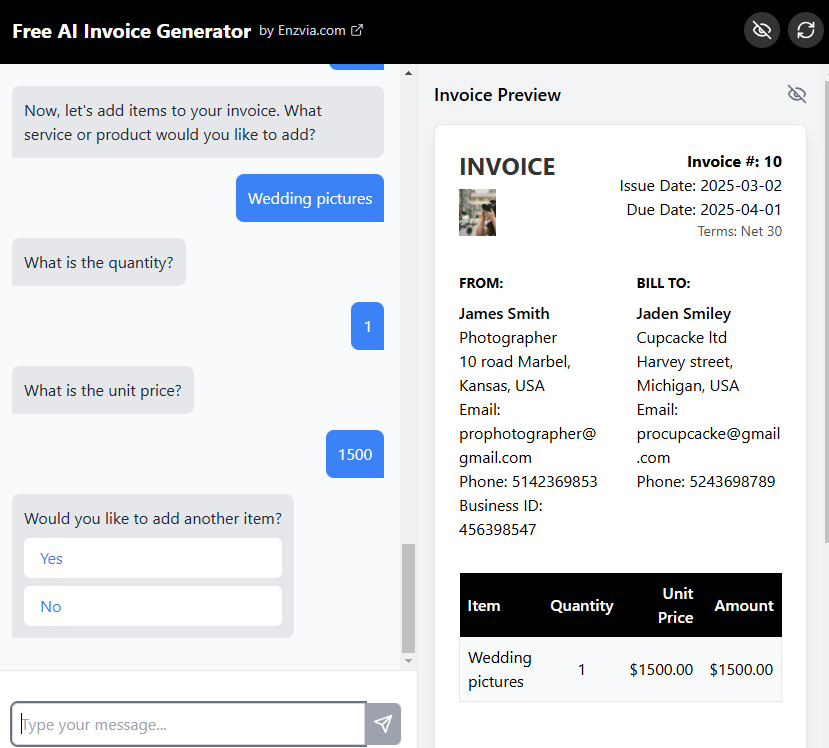
If your priority is simply a customized PDF rather than a QuickBooks-specific workflow, Enzvia’s free invoice generator is another option. It supports business and customer details, logo and color customization, and PDF downloads without a subscription.
Choose according to the task you need to complete. A standalone generator can be useful for document preparation while your existing process handles payment tracking and recordkeeping.
What Should You Check Before Choosing QuickBooks?
Keep the product boundaries clear. Confirm the functions available in the generator, examine any account or subscription prompt, and assess payment services separately.
For international customers, check the currency and business details rather than assuming the interface’s defaults match your situation.
The QuickBooks free invoice generator deserves consideration as a specific tool, with specific limits. Evaluate that tool on its own before deciding whether you also need the wider QuickBooks platform.
For more practical software explanations, explore our Internet guides.
Know someone comparing QuickBooks’ free tools with its paid software? Share this guide to help them separate the options.