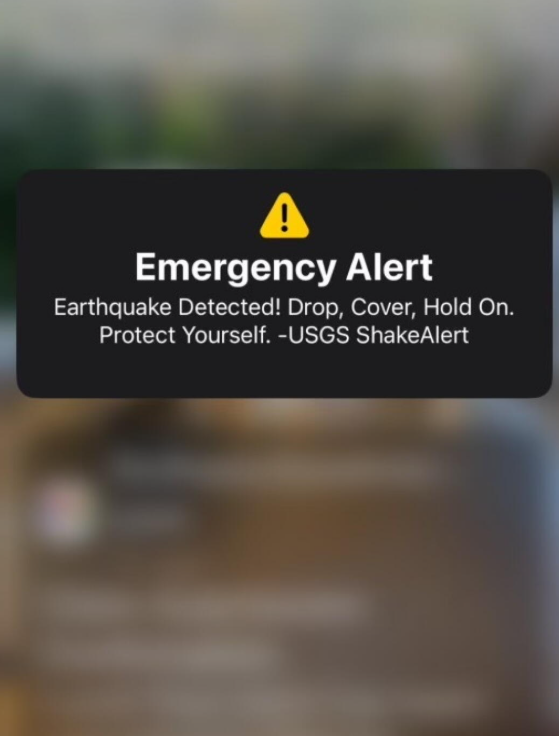
An earthquake alert doesn’t always arrive before the shaking. In a study published in Science in July 2025, 36% of user survey responses reported receiving an Android alert before shaking, 28% during it, and 23% afterward.
Those responses aren’t a guaranteed success rate for every phone or earthquake. They illustrate something worth understanding before changing any settings: early warning can provide useful time, but it cannot promise advance notice at every location.
On iPhone and Android, government alerts, operating-system features, and specialized apps can work alongside one another. Checking the right settings starts with knowing which system serves your location.
What Earthquake Alerts Can Actually Do
Earthquake early warning detects an earthquake that has already started. It doesn’t predict one hours or days in advance.
The system detects the event, estimates the expected shaking, and distributes warnings to relevant areas. The time available depends on the earthquake, distance, detection process, and delivery channel.
Three types of notification are easy to confuse:
- Government emergency alerts, delivered through supported public-warning systems.
- Built-in earthquake alerts, offered through iOS or Android where available.
- App notifications, which may provide early warning, information after an earthquake, or both.
An application displaying earthquakes worldwide doesn’t necessarily deliver early warnings worldwide.
What the Research Says About Alert Timing
The 2025 study published in Science described Android alerts operating across 98 countries during the study period, with approximately 18 million alerts per month associated with about 60 earthquakes monthly.
User feedback included the timing figures mentioned above: 36% before shaking, 28% during, and 23% afterward. These figures describe survey responses rather than measurements from every recipient, and shouldn’t be treated as a complete performance breakdown for all alerts.
The practical implication is straightforward: an alert can help, but feeling shaking is already a reason to take protective action. Waiting for the screen to confirm it wastes time.
The study also describes improving detection through analysis after events. Early warning is an evolving system with limitations, rather than a feature that becomes infallible once switched on.
How to Check Earthquake Alerts on iPhone
Start with Settings → Notifications, then scroll to the bottom.
Under the government-alert section, review the available categories and their settings. Apple says government alerts are enabled by default and supported through compatible carriers using a SIM or eSIM. Availability and labels vary by country or region.
A missing switch doesn’t automatically indicate a fault. Some regions offer different categories, and some government alerts cannot be disabled.
Apple’s official emergency-alert guidance distinguishes these carrier-based warnings from its additional safety-alert features.
Check Enhanced Safety Alerts Separately
Apple documents Enhanced Safety Alerts in the United States and Taiwan on iOS 26.2 or later.
On a supported iPhone:
- Open Settings.
- Select Notifications.
- Scroll to Enhanced Alerts.
- Open Enhanced Safety Alerts.
- Check Earthquake Alerts.
Apple distinguishes an Awareness Alert, notifying you of a nearby earthquake, from a critical Action Alert when strong shaking is expected in your area.
Enhanced alerts use Wi-Fi and cellular data when available. Their presence in one country doesn’t establish availability everywhere an iPhone is sold.
How to Turn On Earthquake Alerts on Android
On a supported Android phone, Google’s documented path is:
Settings → Safety & emergency → Earthquake alerts.
Check that the feature is enabled. Google says earthquake alerts are normally on by default.
If that menu isn’t available, an alternative path may be:
Settings → Location → Advanced → Earthquake alerts.
Names can differ by manufacturer and language. Searching your settings for “earthquake” can help locate the option.
Google requires Wi-Fi or mobile data to be turned on for these alerts. Approximate location is used to determine which devices should receive a warning.
The official Android emergency guidance also explains regional availability. In California, Oregon, and Washington, Android earthquake alerts use ShakeAlert data. Elsewhere, supported regions may use the Android Earthquake Alerts System.
Before traveling, check the destination’s coverage rather than assuming the setup at home applies there.
Wider Coverage Doesn’t Mean Guaranteed Advance Warning
On October 15, 2026, Google announced an expansion from 98 to more than 200 countries and regions. It also reported sending over one billion alerts since launch. Google’s expansion announcement describes that rollout.
These are figures reported by the service provider. One billion alerts doesn’t mean one billion different people, or one billion recipients warned before shaking.
The distinction matters:
- Coverage describes where a system is available.
- Delivery timing describes when a message reaches a device.
- Usefulness depends partly on whether there is time to act.
A larger network can reach more places without providing identical warning times to everyone.
Do You Need the MyShake App?
MyShake delivers ShakeAlert-powered early warnings in California, Oregon, and Washington.
The US Geological Survey lists it alongside other ways to receive warnings in those states, including operating-system features and Wireless Emergency Alerts. It also clarifies that there is no app simply called “ShakeAlert” to download. The USGS alert-reception guide links to the relevant providers.
To set up MyShake:
- Follow an official link to the application store.
- Confirm the application’s name and publisher.
- Complete its setup process.
- Review the requested location and notification permissions.
- Read how it distinguishes early warnings from earthquake information.
Downloading the application without completing setup may leave necessary permissions unavailable.
Its early-warning coverage shouldn’t be confused with any wider earthquake information it displays.
Why Didn’t My Phone Receive an Earthquake Alert?
Silence doesn’t necessarily mean the phone malfunctioned. Not every earthquake triggers a warning for every nearby location.
Google notes that some earthquakes may go undetected, estimates can contain errors, and alerts may arrive before, during, or after shaking begins.
Magnitude and shaking intensity also describe different things. Magnitude characterizes the size of an earthquake; intensity describes the shaking effects at a particular location. A widely reported earthquake doesn’t establish that every phone across a broad region should have received the same message.
Review the issue in this order:
- Coverage: did the relevant system serve your location?
- Settings: were its alerts enabled?
- Connection: was the required network available?
- App setup: were permissions and configuration complete?
- The event: do official reports indicate that a warning applied to your area?
This is more useful than changing several unrelated settings at once.
Can You Test Whether Alerts Work?
Test-alert settings and organized drills don’t provide a universal simulation of every warning system.
Receiving a government test alert doesn’t automatically validate MyShake notifications or Android’s separate earthquake-alert service.
Use only tests documented by the provider or local authorities. A successful test confirms reception under those test conditions; it doesn’t guarantee delivery during every future earthquake.
There’s no need to place an emergency call to check the settings described here.
What About Canada and Other Countries?
US instructions shouldn’t automatically be applied to Canada, the United Kingdom, or another destination.
Check the local emergency authority, the current Apple or Google coverage documentation, carrier compatibility, and the specific territory served by any application.
Government warnings, built-in early alerts, and worldwide earthquake notifications may follow different rules. An app’s ability to show an earthquake on a map doesn’t establish that it could warn you before local shaking.
Prepare Before the Phone Sounds
The USGS recommends “Drop, Cover, and Hold On” when you receive an alert or feel shaking, or another protective action appropriate to your situation.
If shaking has already started, don’t delay while looking for confirmation on the screen.
The useful checks happen beforehand: identify the available system, review its settings, and learn the local safety guidance. A phone can provide another warning channel. Understanding its limits makes that channel more useful.
Share this guide with someone who lives in or travels to an earthquake-prone area so they can check their settings before they need them.